
A sales invitation can let you sign up with agreed terms, including while general online sign-up is closed. Use the offer link sent for your company, rather than starting again from the general registration page.
Steps
- Open your invitation and review the offer shown on the sign-up page. Check the company, plan, billing period, amount, setup charges, trial and validity date that are displayed.
- Complete the company and owner form using the owner email associated with the offer. An offer is not a general discount link to share with another company or email address.
- Confirm the owner email using the message Vixly sends you.
- At the plan step, review the offer again and select Accept this offer if you agree to its terms. Then complete any payment required.
If something goes wrong
An expired, already-used or unsuitable offer cannot be used to start a new subscription. Contact sales if the company details, intended owner email or agreed terms need attention. Do not replace the offer with a guessed promotion code.
Without a valid invitation, a closed sign-up page directs you to the sales team. You can still browse the public plans and help while deciding what your operation needs. Accepting an offer uses the terms shown in that offer, rather than a different plan you happened to view earlier.
On this screen
1 marks the agreed offer details; 2 its partly hidden email restriction; 3 the owner-email field; 4 the button that submits the completed registration form.
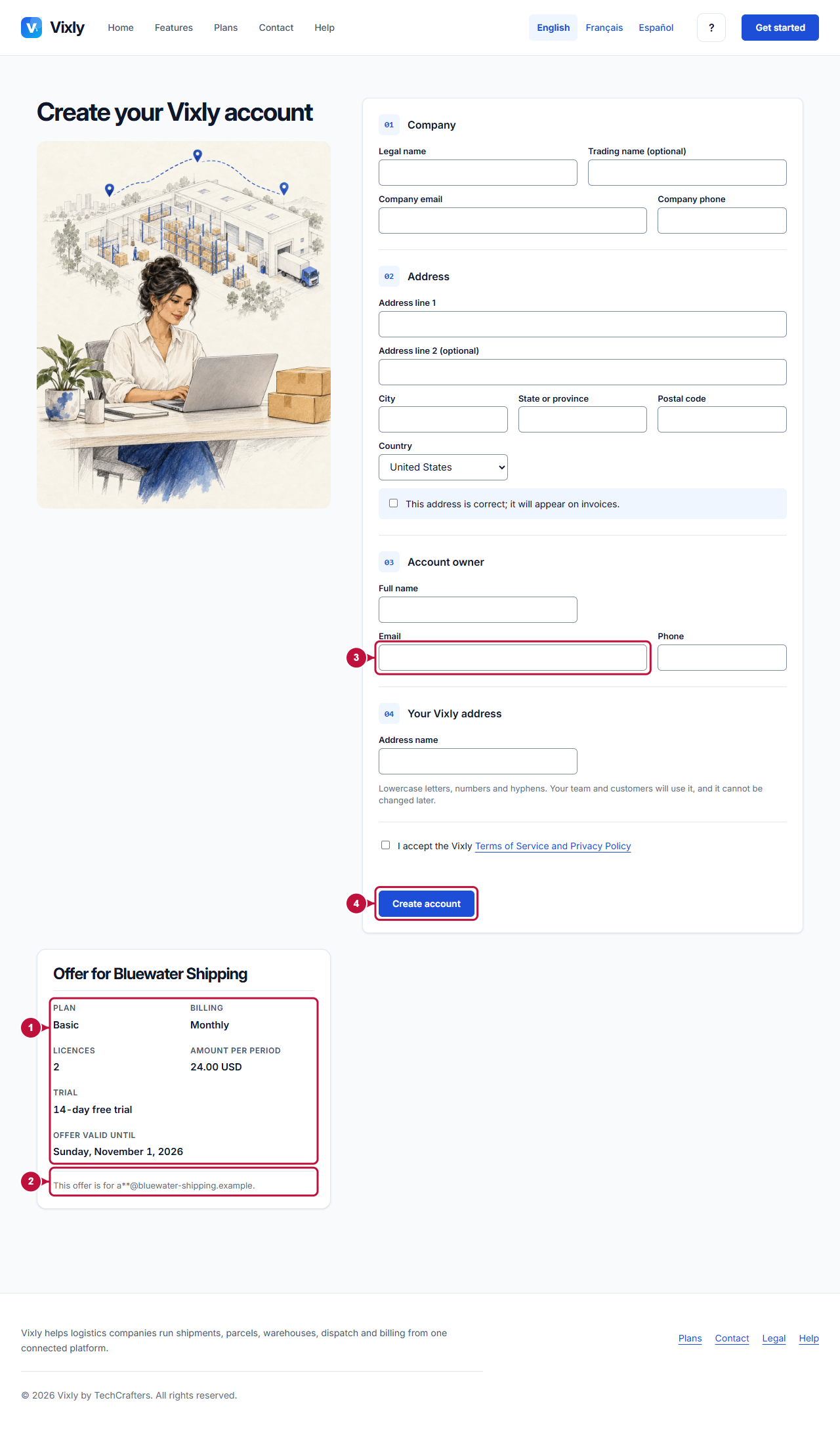
Illustrative screen with fictional demo data. Prices, dates and available choices may differ. Select the image to open it at full size.