
An invoice email can contain a link to a Vixly payment page. This page concerns your company’s Vixly invoice; it is separate from the branded customer portal where your own customers pay their invoices.
Steps
- Open the payment link from the invoice email. Check the company name, Invoice, Amount due, currency and any Due date.
- If Pay by card is offered, review the optional card-saving and automatic-payment choices. Select Continue to payment to open the card provider’s payment page.
- If Pay with Zelle is offered, use the recipient information shown to pay through your bank, then submit the report on this page.
- After returning, read the status message. Card payment can still be confirming, and a Zelle report waits for a bank check. Keep the receipt email when it arrives.
If something goes wrong
This invoice is paid. Thank you. means the invoice is already paid. Online payment is not available for this invoice. Please contact Vixly billing. directs you to Vixly billing when no online method is available. A cancelled checkout can be retried if payment is still needed. If the link cannot be opened or the invoice details need attention, contact billing rather than guessing a different address. Use the language links on the page if you prefer French or Spanish.
On this screen
1 marks the company and invoice balance; 2 the card-payment section; 3 the button to continue. The provider’s own checkout opens after that action.
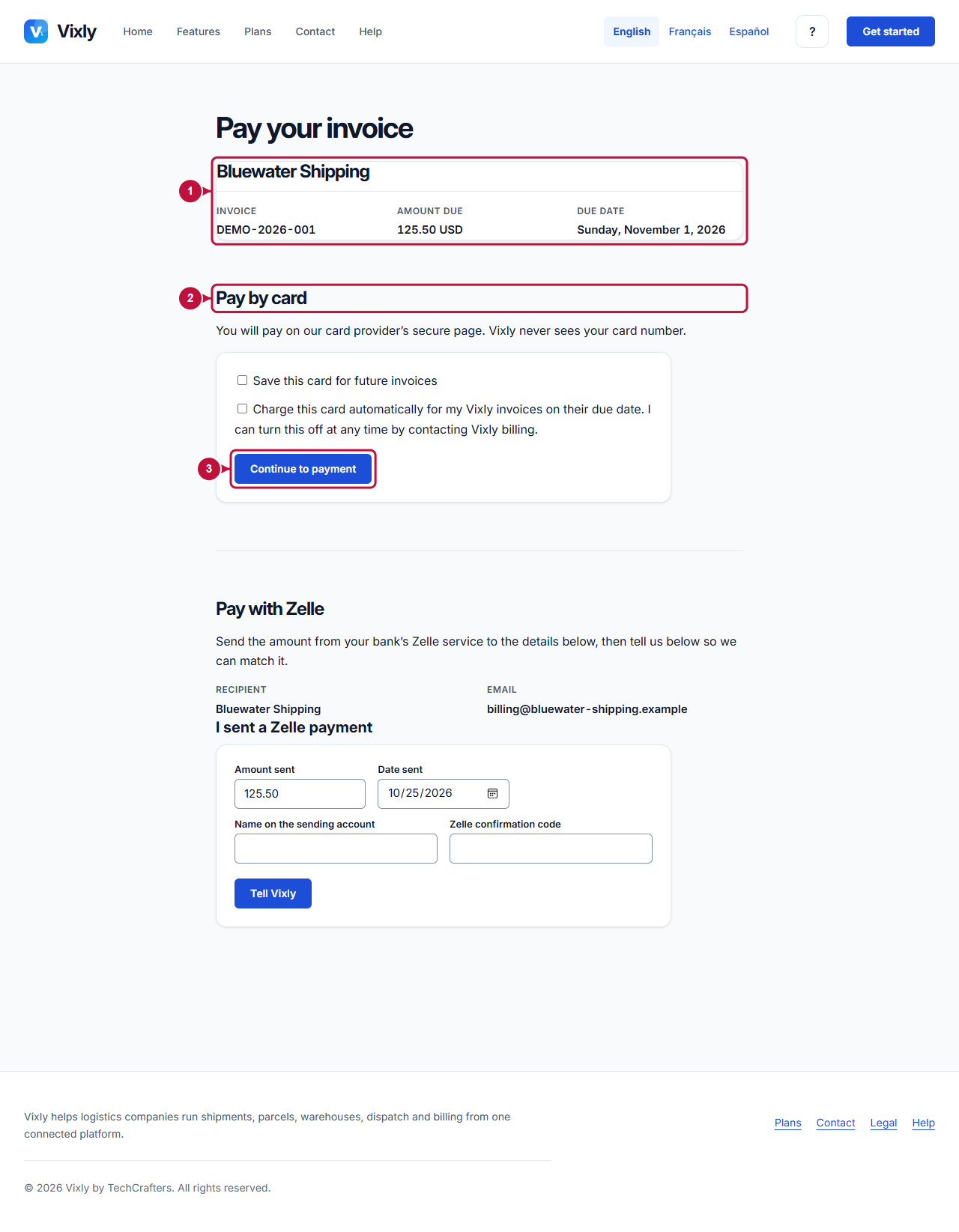
Illustrative screen with fictional demo data. Prices, dates and available choices may differ. Select the image to open it at full size.