
Vixly prices its plans per licensed device. Think about the computers and tablets your staff will use, rather than treating a licence as a shipment allowance.
Before you choose
The plan catalogue shows a minimum licence count and a maximum number of licensed devices. These are different figures: a plan’s device ceiling is not a promise that all those devices are already included in your chosen subscription. The page also lists warehouse limits separately.
Consider where your team works: a counter, receiving area and office may use different devices. Compare that requirement with the plan’s limits and the number of licences you intend to select. Use the prices and currency on the plan card for your comparison; monthly and annual amounts cover different periods.
During sign-up
At the plan step, enter the number in Licences and review Billing before continuing. If you arrived through an offer, review the licences and billing terms in that offer instead.
Registering and approving staff devices happens in your company’s workspace, after account setup. This public site does not enrol a computer or approve an extra device. If you are unsure how many licences your operation needs, describe your intended setup to sales before choosing.
On this screen
1 marks the limits to compare with your device needs; 2 points to the action that carries your plan choice into sign-up.
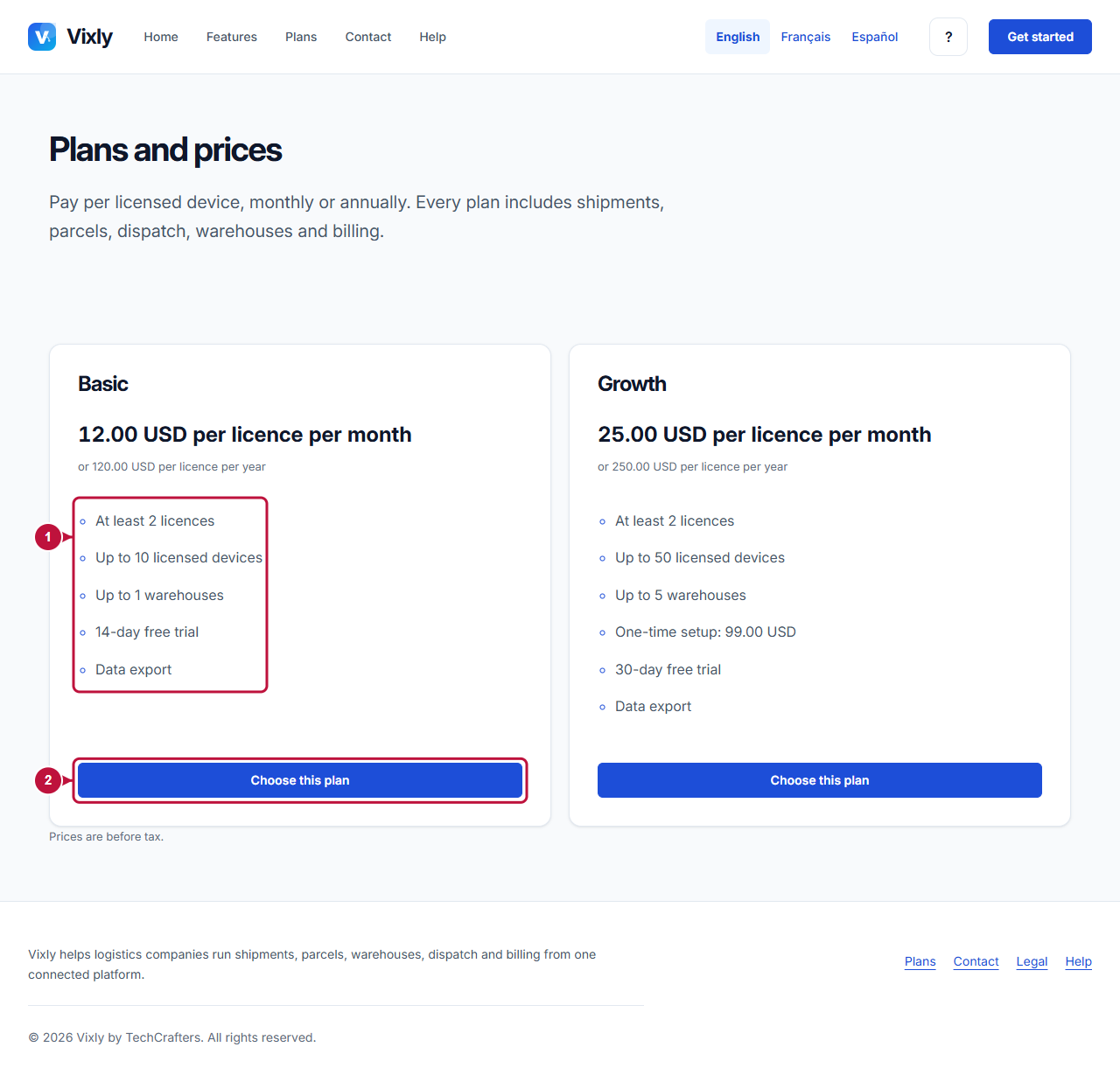
Illustrative screen with fictional demo data. Prices, dates and available choices may differ. Select the image to open it at full size.