
After your plan is accepted and any required payment is confirmed, sign-up moves to account setup. The public site shows the account-created page while your company’s workspace is being prepared.
Read the progress page
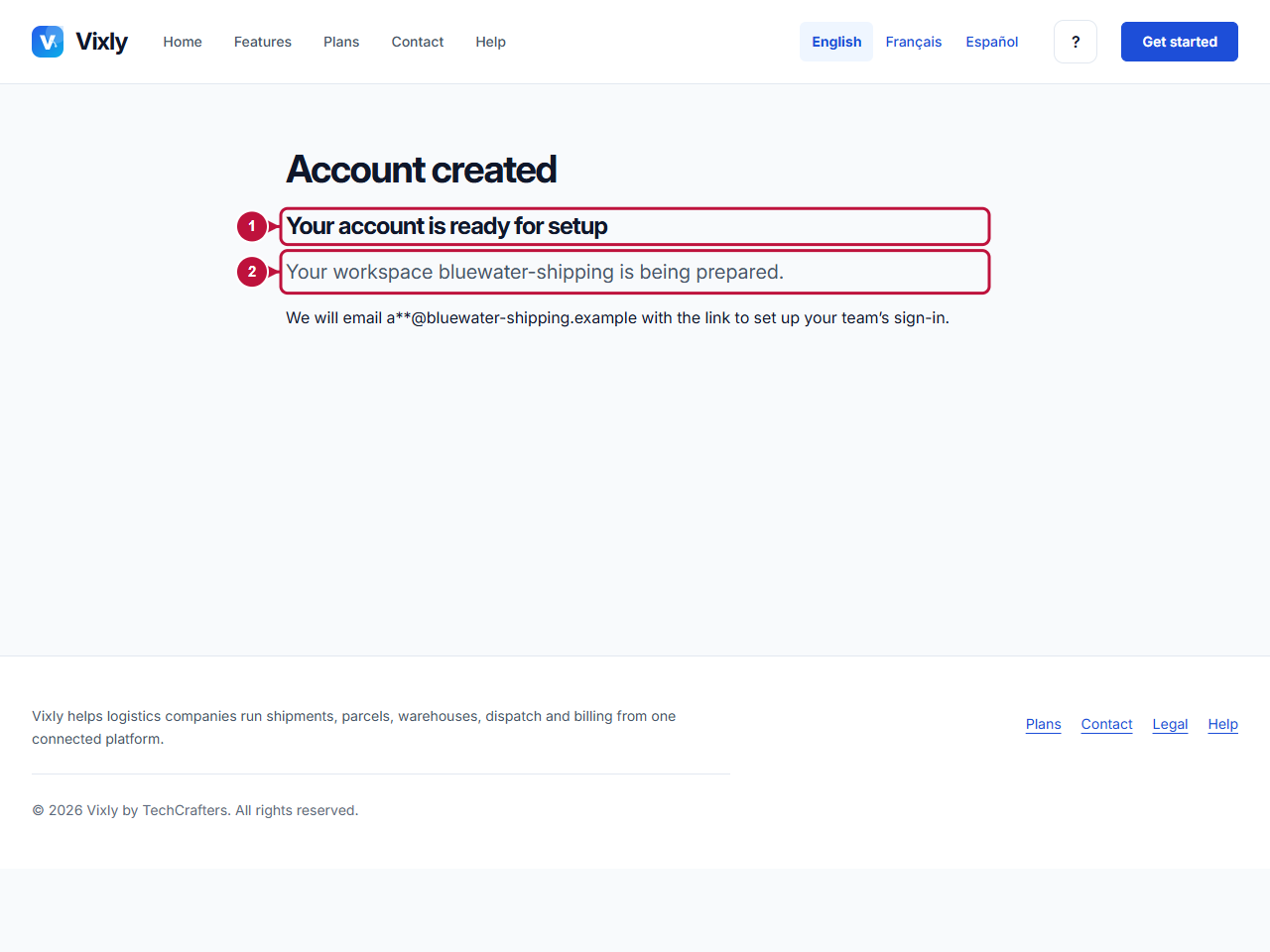
The page identifies your workspace address name and shows a partly hidden email address. It says that Vixly will email a link to set up your team’s sign-in. Keep access to that inbox and check that it is the owner address you intended to use.
If you return from payment and the page still says confirmation is in progress, follow the status displayed there. A cancelled payment instead offers Go to payment. Returning from checkout does not mean you should start a second company registration.
Continue in your company’s workspace
Use the account-setup email when it arrives. Creating the owner’s sign-in and registering the first staff device belong to the company workspace, rather than this public help area. Follow the instructions presented there for your account.
The public progress page is not a staff dashboard and does not manage shipments or staff devices. If you are waiting for setup and need assistance, contact the team with your company name and the stage you reached. Do not send your email confirmation link or payment link in a general enquiry.
On this screen
1 marks the account-created message; 2 identifies the workspace address in the progress text. Continue from the setup email when it arrives.
Illustrative screen with fictional demo data. Prices, dates and available choices may differ. Select the image to open it at full size.